Manage Projects
Clone repositories, inspect project metadata and issues, pin frequent projects, share access, and remove local projects.
Projects → Manage brings project actions and details together. Open /space/#/projects/manage to add repositories, inspect their metadata and GitHub issues, and manage local access.
Add a project
- Click Add project.
- Enter a Repository URL and check the suggested Folder name. You can edit the folder name before cloning.
- Click Clone project. Space clones the repository beneath the configured projects folder and refreshes the catalog.
Repository access must already be available to the Space installation. Validation or clone errors stay in the form so you can correct the input and retry. Existing local projects are discovered from the workspace; the Add form creates a local clone.
Inspect and pin projects
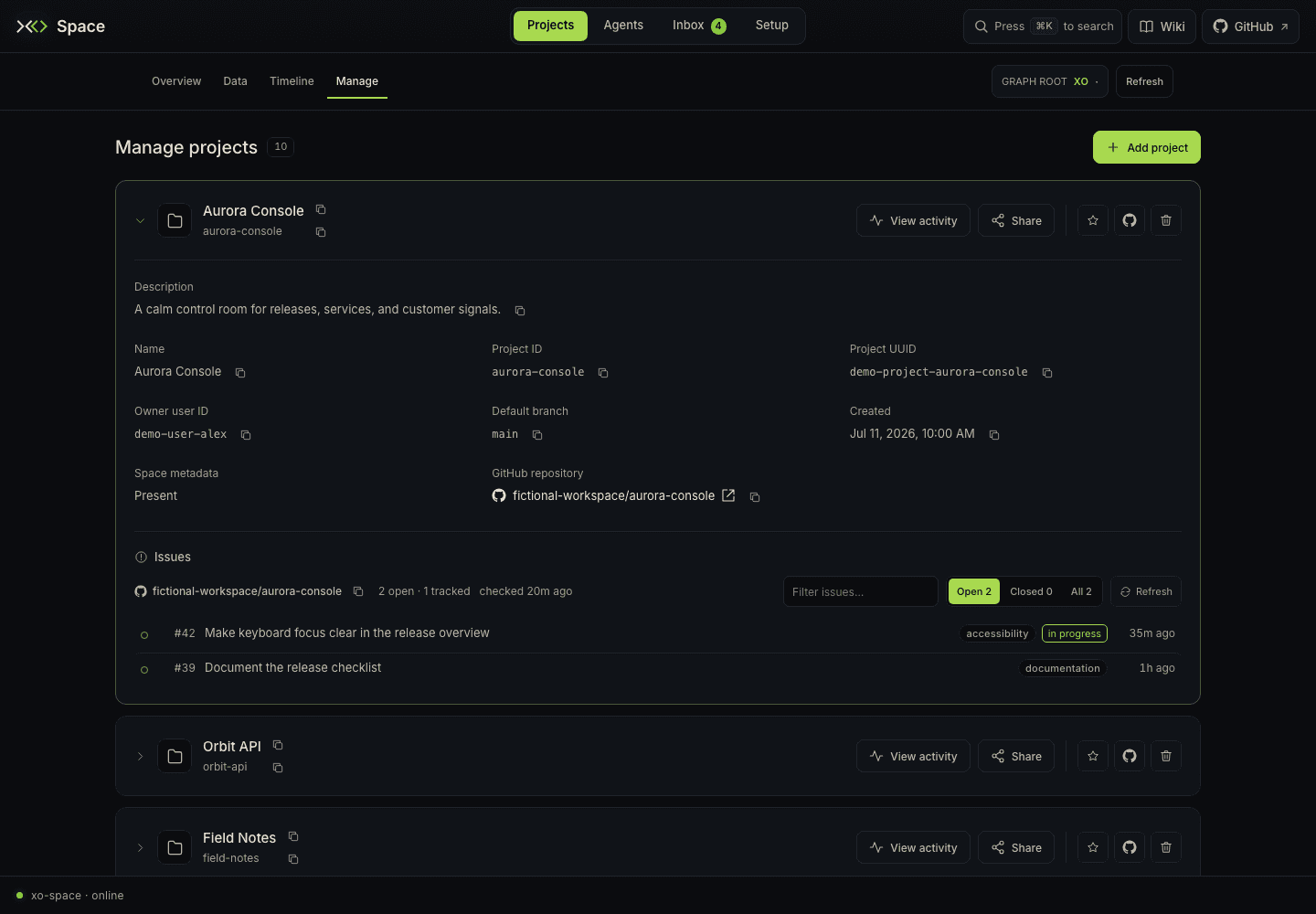
Expand a project card to see its description, display name, project ID, and available metadata such as UUID, owner, default branch, creation time, and GitHub repository. Copy controls sit beside the fields that have values. A folder without canonical metadata reports Space metadata: Not present.
The card's actions include:
| Action | Result |
|---|---|
| View activity | Opens Inbox → Activity with this project selected, including its todos, open sessions, and recent events. |
| Share | Opens an inline Space ID field. Enter the recipient's Space ID and submit Share. |
| Pin project | Saves the project to the browser's pins for Data → List → Pinned. Click again to unpin. |
| Copy GitHub URL | Copies the recorded GitHub repository URL when available. |
| Remove project | Opens an access review and local-deletion confirmation. |
Pins are browser preferences. If browser storage is unavailable, the page explains that the change applies only to the current session. Sharing results appear in the card; use Inbox → Sharing to inspect members, incoming repositories, and pending commits.
Review GitHub issues
Expanded cards include the local GitHub issue mirror. Use Open, Closed, or All, then Filter issues… to narrow the rows. An issue links to GitHub and can show labels, assignee, and tracking state. In progress means work is claimed; tracked means the issue was adopted as a workitem.
The header reports the last poll. Refresh polls GitHub again; changing the issue filter does not. A project without a GitHub origin, a repository with issues disabled, and a failed poll each show their own explanation.
The mirror polls open issues and retains those it later observes closing. It is not a complete archive of issues closed before Space watched the repository. Open GitHub for that history.
Remove a local project
Choose Remove project on the card. Space checks access and lists any blockers, sharing members, and local collaborators. Where allowed, Revoke access and Remove collaborator each require their own confirmation. Use Check access again to refresh the review.
Once access checks allow removal, type the exact project ID and choose Delete local project. Cancel closes the removal panel.
Delete local project deletes this project's local folder and all its files. Remote repositories and backups remain. Copy or commit any work you need before using this action; the access review does not replace your own check for uncommitted files.
Cloning, sharing, and removal are explicit actions. Browsing project cards and issue lists does not run them. The page preserves open forms and drafts when you move between sections or refresh the catalog.