Runtime Discovery
Understand active chat selection, watcher coverage, telemetry providers, native paths, and missing-source troubleshooting.
Space discovers the adapters bundled with the server and checks the runtime files it can read. Finding a CLI, selecting a chat backend, and displaying session telemetry are separate steps.
Three independent choices
| Layer | What it controls | How it is selected |
|---|---|---|
| Active chat backend | Which runtime receives new prompts sent through Space's /api/chat/* API. | AGENT_NAME, exposed in Setup. The local installer defaults to claude_code. |
| Watcher sources | Which native stores feed project presence, events, and derived project history. | QUIRQ_WATCHER_SOURCE_MODE=all or active; the installer defaults to all. |
| Agents dashboard providers | Which sources contribute to /xo/sessions.json. | Discovered session_telemetry capabilities with readable data, enabled in Agents → Configure, independently of the active backend. |
Space does not choose a new chat backend merely because its executable appears on
PATH. A backend also needs its native login, credential, or gateway to be ready.
Supported runtimes
| Runtime | Chat backend value | Executable / connection | Native state by default | Aggregate Agents dashboard |
|---|---|---|---|---|
| Claude Code | claude_code | claude CLI | ~/.claude/; aggregate telemetry via Argus | Yes, when its telemetry database is readable |
| Codex | codex | codex CLI | $CODEX_HOME, otherwise ~/.codex/ | Yes |
| OpenClaw | openclaw | Configured gateway | ~/.openclaw/ | No aggregate provider in the current build |
| Hermes | hermes | Configured gateway/profile | ~/.hermes/ | No aggregate provider in the current build |
| Antigravity | antigravity | agy CLI | ~/.gemini/antigravity-cli/ | No aggregate provider in the current build |
| Cursor | None | Read-only local telemetry | ~/.cursor/ and available desktop user-data stores | Yes |
The five chat backends also have native session and watcher adapters. Cursor's read-only dashboard provider does not make it an active Space chat backend. Capabilities and data availability can differ even when two runtimes are installed on the same machine.
Inspect what Space can see
Open Setup → Intelligence layer and inspect Connect an agent and Activity collection. Expand Agent details to see native paths and session information. The server reads the filesystem of the machine and user account it runs as. A Space in a container or remote workspace cannot infer the native stores on your laptop unless those stores are made accessible there.
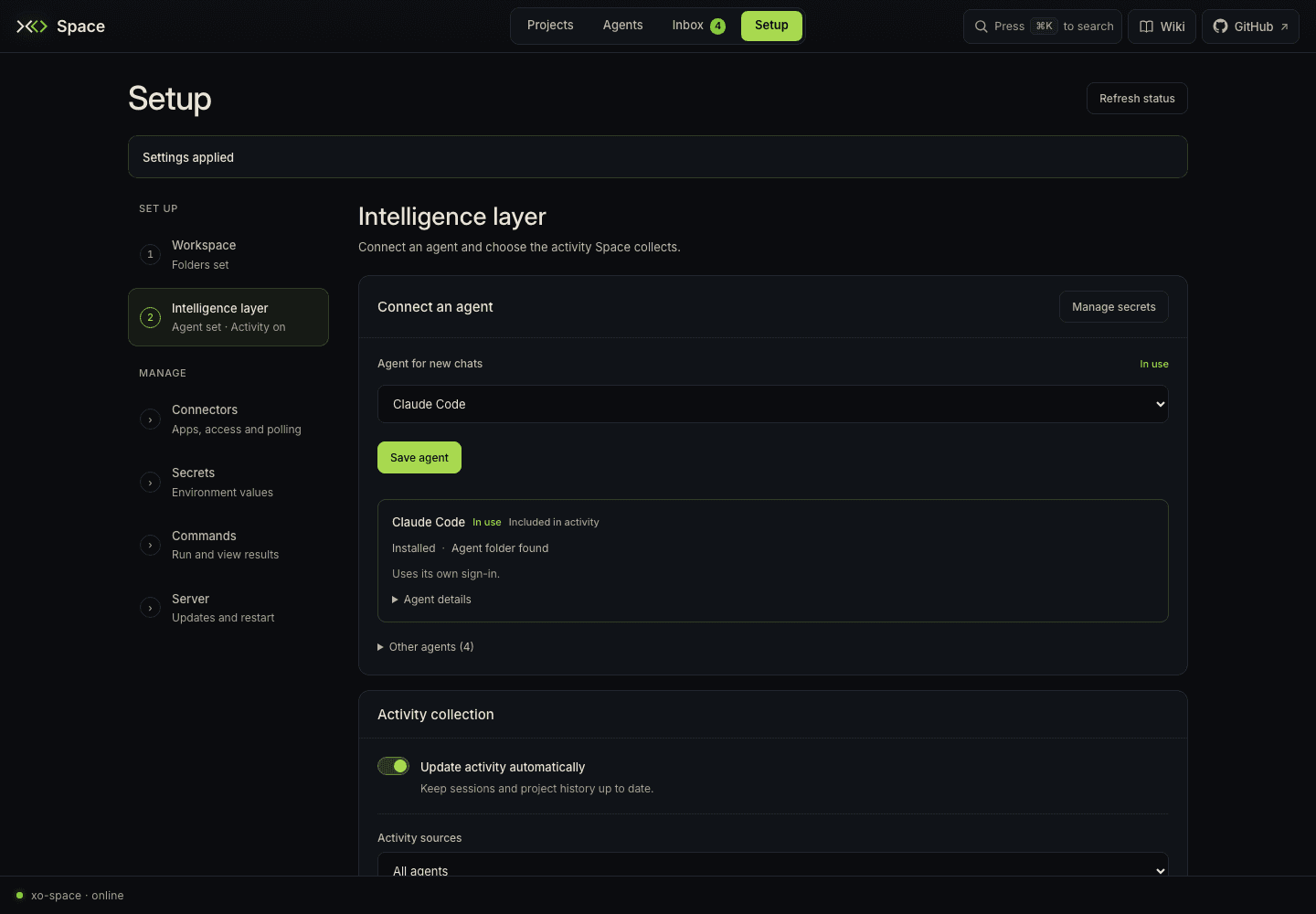
For a read-only API check:
curl -fsS http://localhost:5002/health
curl -fsS http://localhost:5002/api/runtime-config
curl -fsS http://localhost:5002/api/config/workspace
/health confirms the server is responding. /api/runtime-config provides the
runtime and source diagnostics used by Setup; /api/config/workspace identifies
the configured workspace roots. A healthy server alone does not prove that every
runtime's telemetry is available.
Native path overrides
Use the same paths for Space that your runtime uses to write its data. Agents → Configure can save the supported aggregate source paths and pause or enable collection. Those changes apply on the next aggregate rebuild without a restart. Other environment or install-configuration changes may need a restart.
| Setting | Use |
|---|---|
CODEX_HOME | Redirect Codex's native state root. Space reads its session rollouts and available state database there. |
ARGUS_DB | Redirect the Claude Code aggregate telemetry database; default ~/.argus/argus.db. |
CURSOR_HOME | Redirect Cursor transcript/chat stores; default ~/.cursor. |
CURSOR_USER_DATA or CURSOR_DATA_DIR | Point to Cursor desktop user data for available state.vscdb token snapshots. |
CLAUDE_CLI_PATH or CODEX_CLI_PATH | Explicit CLI paths where supported by the corresponding runtime configuration. |
For gateway URLs, tokens, and other runtime settings, use the source checkout's
.env.example
and the runtime's own setup instructions. Keep credentials out of project files.
Troubleshoot a missing source
- Check the server user and machine. Confirm the native files are visible to the process running Space, not just to another terminal user or host.
- Check the executable and login separately. A missing CLI prevents dispatch; a missing telemetry store prevents observation. One can work without the other.
- Run one session in the project. Use a working directory under the configured XO projects root so the watcher can attribute it correctly.
- Check watcher mode. Choose
allwhen you want project events from multiple supported runtimes. This setting does not add new aggregate Agents providers. - Inspect source-specific data. Check collection switches and paths in Agents → Configure. Claude Code aggregate telemetry needs Argus ingestion; Codex needs its native state database for the current collector; Cursor needs usable transcripts or desktop session data.
- Refresh and inspect the log. The server log path is printed at startup. Setup reports source paths and readiness. Agents distinguishes unavailable providers from available sources with no matching rows; time windows apply to its Overview and Trends pages.
The local installer installs Space's Python requirements, including its ingestion dependency, but skips agent CLI installation by default. Installing Space does not authenticate a runtime or recreate a missing native history.
Read observability to interpret incomplete token and cost data, or contributing to add a provider.