Connectors
Connect workspace tools and account apps, choose access for this Space, and configure actions and Inbox polling.
Setup → Connectors manages tools for this workspace and external apps
connected to your XO account. Open /space/#/setup/connectors; the older
#/connectors link still works.
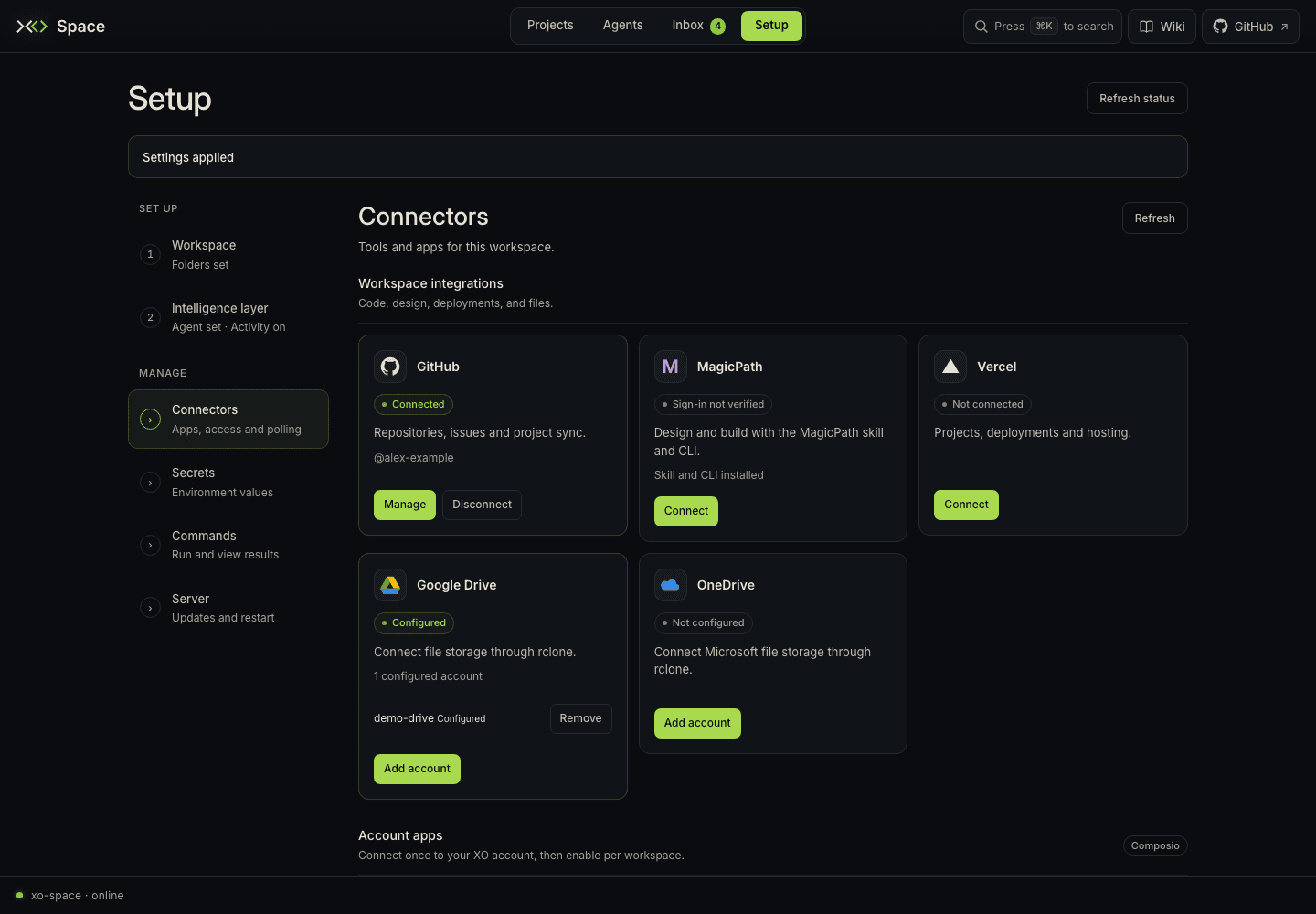
The page has two groups with different connection scopes:
| Group | What it connects | Where access is managed |
|---|---|---|
| Workspace integrations | GitHub, MagicPath, Vercel, Google Drive, OneDrive | This Space's native connector APIs, CLIs, and file-storage configuration |
| Account apps | Apps from the server's Composio catalog | Your XO account owns the connection; each workspace enables its own access |
When the page's Filter connectors… field is visible, it narrows cards by name, description, or available account information. See the search guide for the current toolbar behavior. Refresh checks both groups. Workspace integrations remain available even when XO sign-in or the account-app catalog is unavailable.
Connect a workspace integration
GitHub
- On the GitHub card, click Connect (or Manage for an existing connection).
- Paste a Personal access token and choose Save token, or choose Sign in with GitHub.
- For browser sign-in, follow Continue sign-in, enter the displayed device code on GitHub, and authorize access.
- Return to Space. It checks the connection automatically; Check connection also refreshes its status. A connected card shows the GitHub username.
Vercel
Open Connect and either save an API token or choose Sign in with Vercel. Approve access in the browser. If the redirect cannot load, paste its full URL into Redirect URL and choose Complete sign-in. The card polls for completion and then displays the connected account.
Browser sign-in is offered when Vercel needs authentication. An already connected account must be disconnected before starting another browser sign-in; token replacement remains available through Manage. Stop waiting ends the UI's wait for a Vercel sign-in.
Google Drive and OneDrive
These file-storage connections use rclone on the Space server:
- Click Add account on the relevant card.
- Enter an Account name using lowercase letters, numbers,
-, or_(up to 32 characters), then choose Start sign-in. - Follow Continue sign-in and approve access with the provider.
- Paste the full redirect URL into the Space form and choose Complete sign-in.
- Check that the named account is Configured. Each card can list several accounts; Remove disconnects the selected one after confirmation.
An Incomplete account needs sign-in to finish. If status is unavailable, check that rclone is installed and available to the server.
MagicPath
If needed, choose Install skill & CLI. Then use Connect → Open MagicPath sign-in, approve access, and paste the returned Authorization code into Space. Choose Complete sign-in and verify the account on the card. The card reports CLI/skill installation separately from verified sign-in.
For native integrations, Disconnect acts on that workspace's connection. During a pending login, finish or cancel that sign-in before starting another.
Before connecting
The following sections cover Account apps. Your Space must be signed in to
XO and have a workspace identity. The signed-out message tells you to sign in
through the app or configure XO_API_KEY and XO_SPACE_ID in Secrets, then
refresh after applying any required restart. Composio credentials and app
authorization configurations belong on xo-swarm-api, not in this browser or
the workspace's .env.
Available apps and sign-in methods come from the server's toolkit catalog. Read each card: some use OAuth; others ask for an API key or bot token through the connection page. Telegram, for example, uses a bot token. A catalog entry does not necessarily have an Inbox collector.
Connect and enable an app
- Choose Connect on the app's card.
- Complete the provider's sign-in or credential flow in the new window. If the browser blocks it, allow the connection popup and try again.
- Return to Space and wait for the connection status to update. Use Refresh if needed.
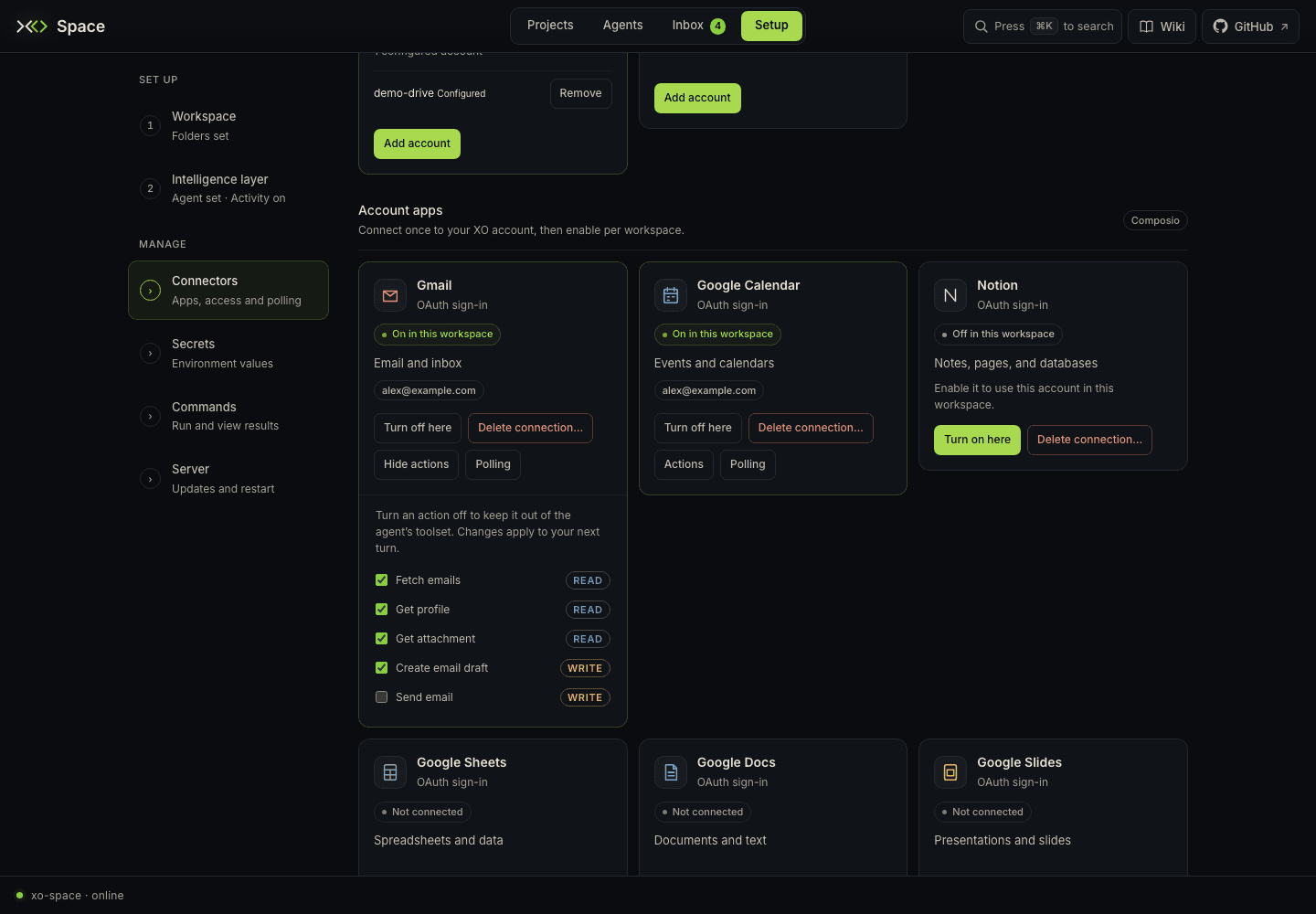
- If the card says it is connected on your account but off here, choose Turn on here to let this workspace use it.
- Check the account chip where available. Gmail and Google Calendar resolve the email or label of the account bound to this workspace; the label may appear after the connection itself.
The app connection belongs to your XO account, while Turn on here and Turn off here control this workspace's access. The Actions drawer appears for enabled apps that support per-action preferences. Uncheck an action to remove it from the agent's toolset; changes apply to the next agent turn. Opening or refreshing Connectors also asks the server to refresh the agent's MCP gateway wiring.
Collect app events into Inbox
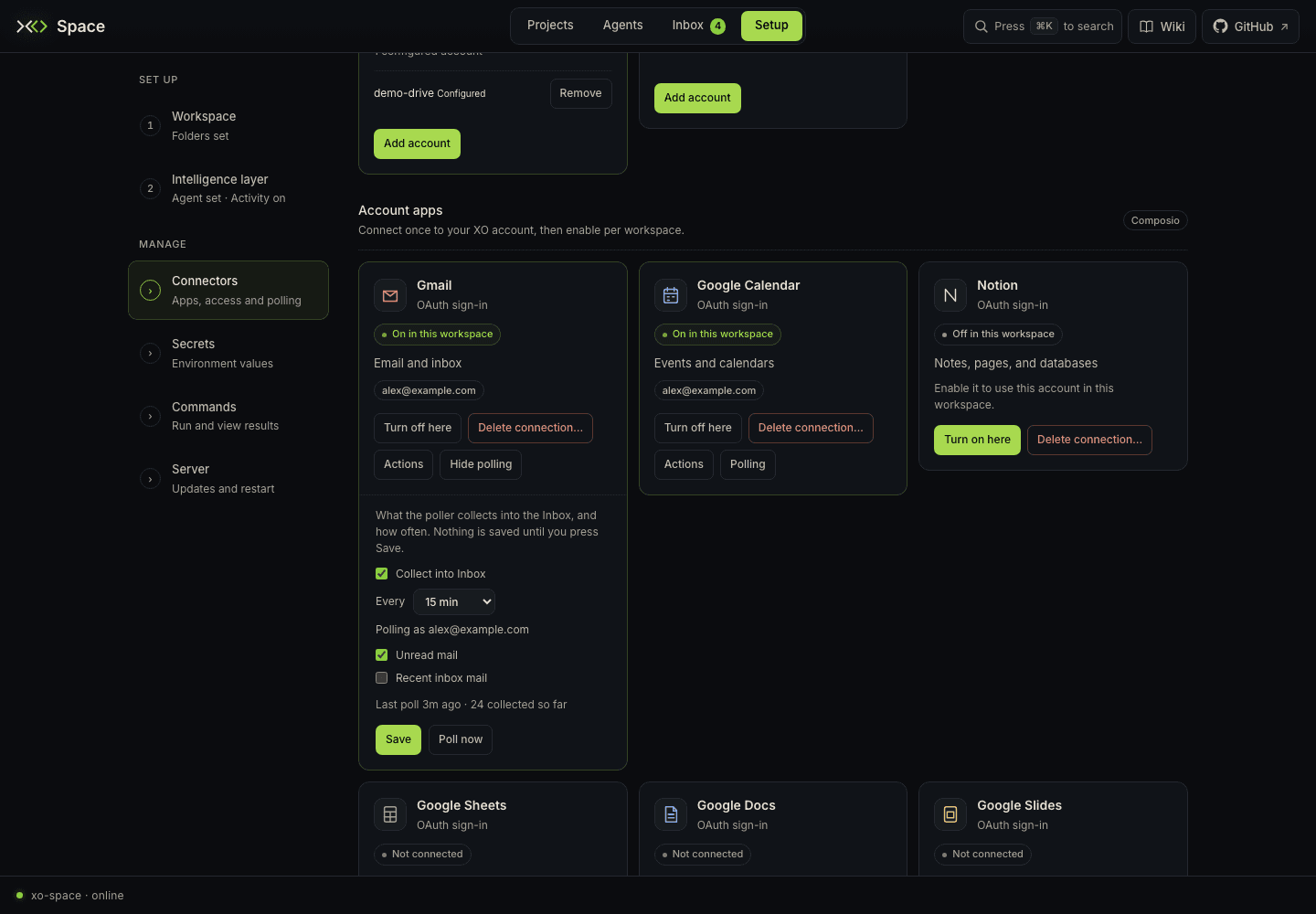
- With the app connected and enabled here, open Polling.
- Check Collect into Inbox.
- Choose the cadence under Every and the collectors you want.
- Press Save. Closing the drawer or switching to another app's polling drawer discards unsaved changes.
- Choose Poll now to check the saved configuration, then inspect its result and the Inbox.
Polling uses the saved settings. The Poll now button is unavailable until a configuration has been saved. The drawer displays the last poll or error and, when known, the account it polls as.
| App | Available collectors in this version |
|---|---|
| Gmail | Unread mail; new mail in Inbox from the last day |
| Google Calendar | Upcoming events over the next seven days across the account's calendars, including shared and secondary calendars |
| Notion | Recently edited pages |
| Slack | Messages from the last day |
| Telegram | New messages or channel posts available to the bot |
Collectors make bounded reads. Gmail requests metadata without full message payloads and shows a warning if the provider truncates its response. Calendar reports per-calendar failures even when other calendars return events. These feeds help you notice work; use Open link in Inbox for the original content when available.
Turn off or remove a connection
Turn off here stops this workspace using the connected app without deleting the account connection. Delete connection… removes that connection from every workspace in your XO account after confirmation. Deleting it in XO does not itself revoke the authorization grant at the provider; manage that in the provider's account settings if required.
Troubleshoot a connection
| Message or symptom | Next step |
|---|---|
| Sign in to XO | Sign in/configure the server's XO identity, then refresh |
| Session expired | Reload the page to establish a fresh browser session |
| Account apps need server configuration | Check the server's XO access and the Composio configuration on xo-swarm-api |
| Could not load account apps | Read the xo-space server log; a server error alone does not identify which credential or upstream service failed |
| Connected, but no incoming items | Turn the toolkit on here, save polling, select collectors, and inspect Poll now's result |
| No collectors available | The toolkit can offer agent actions without an Inbox collector in this version |
| Telegram polling fails with a webhook conflict | Check the bot's existing webhook arrangement; Telegram's update polling cannot run alongside an active webhook |
| Wrong or missing email label | Refresh and check the authorized account; label lookup failure does not by itself mean the connection failed |
Automatic polling needs the server running, signed in, the toolkit enabled here, saved collection enabled, and the background poller enabled (XO_CONNECTIONS_POLL_ENABLED). Poll now can still run with the background poller or Collect into Inbox switched off: it ignores the automatic cadence and collection toggle, but still requires saved collectors and workspace access to the toolkit.
Saved polling configuration and collected event files live under the machine-local state root's connections/ directory. They do not travel with a shared project.