Environment Use Cases
See how focused environments turn complex domains into observable, testable workflows.
An environment becomes useful when it turns a real question into something a person can inspect, change, and check. The examples below begin with the live quirqs Observatory and show how that pattern supports education, research exploration, engineering discussion, and communication.
See an environment in practice
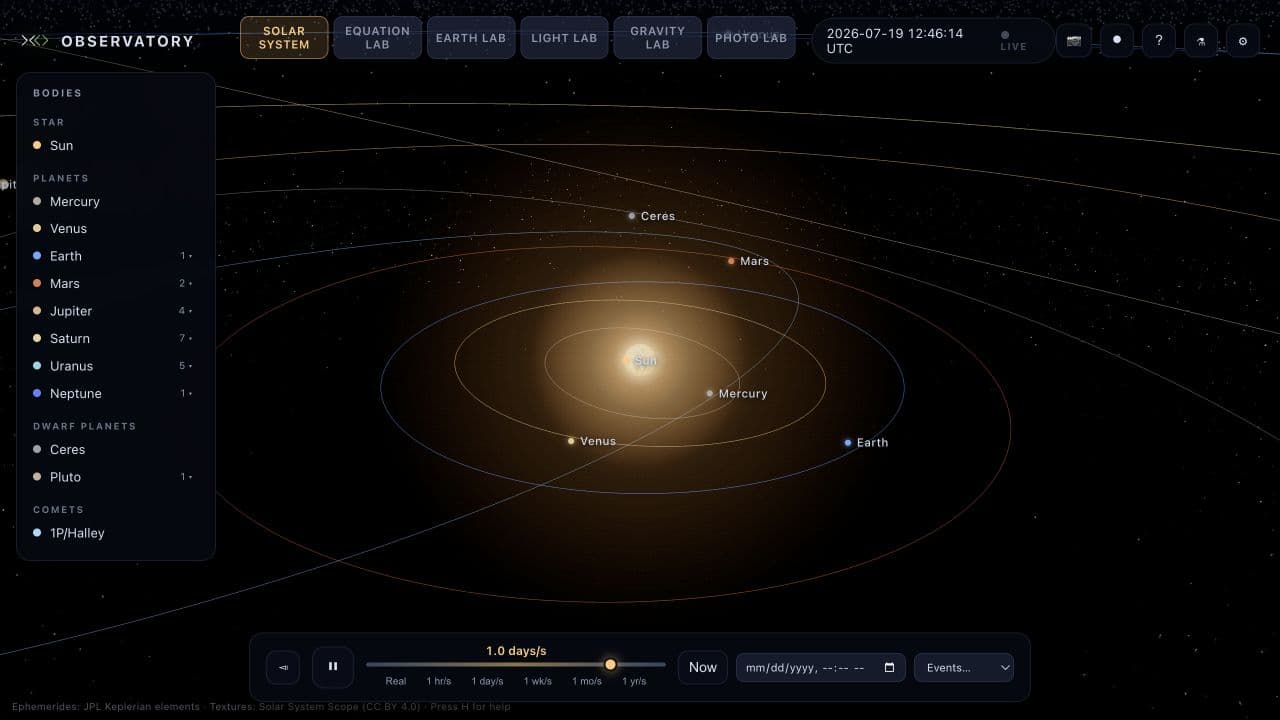
The live Solar System environment in the quirqs Observatory. The same space provides Solar System, Equation, Earth, Light, Gravity, and Photo labs.
This is more than a picture of the solar system. The interface brings the parts of an investigation together:
- A subject to inspect: the Bodies panel lists the Sun, planets, dwarf planets, and Halley's Comet.
- A state to observe: the central view shows named bodies and their orbital paths.
- Variables to control: playback, simulation rate, date, and an Events selector let the user choose when and how the system is observed.
- A visible model context: the screen identifies its ephemerides as JPL Keplerian elements, so the visualization is not presented without context.
The environment does not make the conclusion for the user. It gives them a bounded place to ask a question, change a variable, observe the result, and keep enough context for someone else to understand what they saw.
Choose by the job you need to do
Explore a system over time
Solar-System Observatory
Explore bodies, dates, and known events in a time-controlled celestial model.
Orbital Mechanics
Compare orbits, escape, force laws, and known analytic expectations.
Use these environments when the important variables are time, motion, position, or a changing physical state. A real-world outcome might be a reproducible astronomy lesson, a comparison against a known orbit, or a clear explanation of a historical celestial event.
Test and compare models
Equation & Data Modeling
Test equations, fit data, compare models, and preserve reproducible versions.
Optical Systems
Trace rays and compare how geometry, wavelength, and material change light.
Use these environments when the job is to test a hypothesis, compare two configurations, or make model assumptions visible. A useful result is not just a rendered view; it includes the inputs, changed parameters, output, and a check against data or a known case.
Explain and discuss physical systems
Earth & Offshore Engineering
Teach Earth systems and discuss mooring behavior under changing environmental loads.
Photophysics & Plant Science
Make photon energy, electron emission, pigments, and photosynthesis observable.
Use these environments when learners, specialists, and reviewers need a shared view of a physical process. They can support a lesson, an early what-if discussion, or a structured comparison before work moves into a certified or specialist tool.
Turn an example into a real workflow
Each use-case page answers the same practical questions:
- What real-world job does the environment support?
- Who uses it?
- What enters the environment?
- Which controls and tools are available?
- What comes out?
- How does a reviewer know the result is acceptable?
When adapting an example, keep those six parts together. Replace planetary bodies with customer records, equations with a pricing model, or ray traces with deployment logs; the environment-design discipline remains the same.
These environments are strong for learning, research exploration, design discussion, and early what-if analysis. They do not replace certified tools or expert review for safety-critical, mission-critical, or regulated decisions.
Ready to make your own? Build an environment or start from a reusable template.